

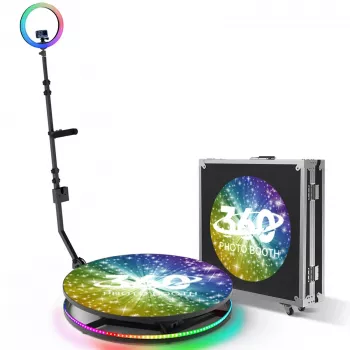
Slow Motion 360 Photo Booth Guide: Setup, Lighting & Tips

A slow-motion photo booth adds a cinematic twist to guest photos by capturing short clips at higher frame rates and playing them back smoothly in slow motion. The 360-style version combines slow motion with a rotating camera arm around a standing platform, creating shareable, “music-video” style spins that work well for weddings, parties, corporate events, and brand activations.
What a slow-motion photo booth is (and what makes it “360”)
Traditional slow-motion booths capture short video moments—think confetti pops, champagne pours, and hair flips—then play them back at a slower speed so every detail feels dramatic. What makes a booth “360” is the orbiting shot: guests stand on a stable platform while a camera travels around them on a motorized arm for a smooth, circular perspective.
The slow-motion effect typically comes from recording at higher frame rates (the source video contains more frames per second), then exporting at standard playback speed so motion looks fluid when slowed down. For the cleanest results, aim for controlled lighting, a clear guest pose zone, and a consistent clip length so every group gets the same polished look.
Why slow motion works so well at events
Slow motion feels instantly premium because it highlights movement and emotion that still photos can’t capture—sparkling dresses, cheering hands, and that “big moment” reaction. It also drives sharing: short clips are easy to send by text, AirDrop, or QR download, and they fit naturally into Reels and Shorts.
It’s flexible across themes, from glam red carpet and nightclub vibes to sports celebrations, product launches, quinceañeras, and proms. Props and simple motion prompts help guests participate without feeling awkward, and hosts benefit from repeatable output using consistent overlays, event date tags, and sponsor logos.
How the slow-motion 360 effect is created
1) Platform + rotating arm
A motor drives a camera arm in a smooth circle around guests. When the rotation is steady and the platform is level, the clip feels “floating” and intentional rather than shaky.
2) High-frame-rate capture
Many setups use a smartphone or action camera capable of high-fps video. If you’re using an iPhone, Apple’s guide to recording Slo-mo explains the basic capture options and settings: Apple Support: Record slow-motion video on iPhone.
3) Lighting that stays bright and even
Slow motion rewards brightness. More light helps reduce motion blur and keeps faces crisp as the camera moves. Avoid harsh backlighting that turns guests into silhouettes; consistent front/side lighting is easier to edit and export quickly.
4) Stabilization and workflow
Secure mounting and balanced rotation reduce wobble, and a level platform keeps the horizon steady. On the software side, templates (trim points, speed ramps, overlays, and export presets) standardize output so sharing stays fast. For a plain-language overview of what “slow motion” means, see Wikipedia: Slow motion.
Space, power, and safety basics for a smooth setup
Plan more room than the platform alone: you need space for the rotating arm’s sweep, a short queue line, and an operator zone to cue poses and start/stop the capture. Indoors is easiest, but outdoor setups can work with a flat, stable surface and proper support.
| Event size | Recommended clear area | Typical group size | Staffing | Notes |
|---|---|---|---|---|
| Small (up to ~75 guests) | 8 ft x 8 ft | 1–2 on platform | 1 attendant | Keep props simple; focus on fast sharing |
| Medium (~75–200 guests) | 10 ft x 10 ft | 2–3 on platform | 1–2 attendants | Add a queue lane and pre-set motion prompts |
| Large (200+ guests) | 12 ft x 12 ft | 3–5 (if platform rated) | 2 attendants | Stagger groups and use preset templates for speed |
Features that matter when choosing a 360 slow-motion booth
Product picks for a standout event setup
If you’re building a rental package or upgrading your event entertainment, the Slow Motion 360 Photo Booth is designed to produce consistent 360-style slow-motion clips that guests can download and share quickly. It performs best with bright lighting, a clearly marked pose zone, and a repeatable operating routine (cue, rotate, capture, apply template, share).
To improve video clarity, venue lighting makes a bigger difference than most people expect. For a statement look that complements upscale events, consider upgrading ambient light with the Luxury Gold Crystal Branch Chandelier – Modern Ceiling Pendant Lighting (ideal for permanent installs, lounges, or styled indoor activations).
For networking events and brand activations where guests may need a quick icebreaker before stepping onto the platform, the Meaningful Conversation Starter Guide | Printable Guide for Dating, Friendship & Networking | Deep Questions & Prompt Examples can help hosts keep energy high and participation easy.
Simple operating playbook for better clips
Care, transport, and longevity tips
FAQ
How many people can use a 360 slow-motion booth at once?
It depends on the platform size and load rating, but many setups work best with 1–2 people on smaller platforms and 3–5 on larger, higher-rated platforms. Prioritize stability, clear posing space, and safety over squeezing in an extra person.
What lighting is best for slow-motion booth videos?
Bright, even lighting is best because it reduces motion blur and keeps faces sharp during rotation. Ring lights or LED panels work well; avoid harsh backlighting and keep exposure consistent so editing stays quick.
Do guests get the videos instantly?
In many setups, guests can receive videos within minutes via QR download, text/email, or AirDrop. Speed depends on template complexity, the capture device’s performance, and how strong the venue’s Wi‑Fi or cellular connection is.
Recommended for you
Luxury Interior Design Checklist for Elegant Living
Aug 29, 2026








Leave a comment