

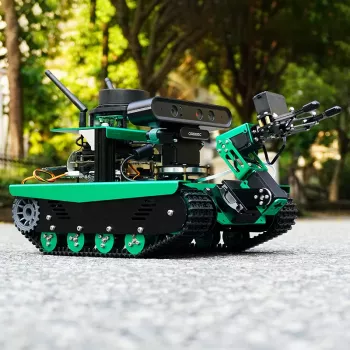
Build an AI Robot Tank: Lidar, Vision & Python Control

AI Vision Robot Tank Kit with Lidar & Python Programming: Build, Map, and Navigate
A tracked robot platform that combines AI vision, lidar ranging, and Python control sits in a sweet spot between entry-level robotics and true autonomy. The tracked “tank” form factor handles indoor surfaces with fewer traction surprises, while lidar and a camera open the door to obstacle-aware driving, basic mapping experiments, and vision-based behaviors. If the goal is to move beyond scripted motions and into perception-driven motion planning, this style of kit provides a practical path from first drive commands to repeatable navigation routines.
What This Robot Tank Kit Is Designed to Do
This category of robot tank kit is built for controlled indoor mobility plus sensing—enough to test real robotics concepts without turning every milestone into a mechanical engineering project.
- Tracked drivetrain: Stable movement across carpet, thresholds, and uneven indoor surfaces, with predictable turning when tuned.
- Lidar ranging: Distance measurements for obstacle detection and mapping-style experiments (scan visualization, contour “shapes,” and room boundaries).
- Camera-based vision: Object tracking, line following, marker detection, and basic perception pipelines that influence steering.
- Python-first control: Rapid iteration for behaviors, debugging, and data capture.
- Expandability: Room to add sensors, mount payloads, and—if the specific model supports it—attach a small arm or gripper for manipulation demos.
Core Hardware That Shapes Performance
Two robot tanks can look similar and still behave very differently. Performance is mostly defined by sensor quality, compute headroom, and consistent power delivery.
- Lidar module: Usable range and scan rate determine how early the robot “sees” obstacles and how smooth the contour looks in a cluttered room.
- Camera (and optional depth camera): Low-light behavior, motion blur, and depth awareness all affect tracking stability and how reliably a target stays detected.
- Compute board/controller: On-device vision feels responsive only if the processor can maintain frame rate while also reading lidar and driving motors.
- Motor drivers and encoders (if included): Encoders improve speed repeatability and help with dead-reckoning for straighter paths and more consistent turns.
- Chassis geometry: Track width, ground clearance, and weight distribution influence turning radius, traction, and how often it high-centers.
- Power system: Battery capacity and voltage stability matter for lidar spin-up, camera reliability, and maintaining torque under load.
Software Stack Options: Python-First Development
Python is the glue that makes experimentation productive: short scripts can read sensors, decide what to do next, and command the drivetrain. For vision work, many projects rely on established libraries and repeatable pipelines.
- Python control layer: Drive commands, sensor reads, and behavior orchestration in readable, testable functions.
- Computer vision pipelines: Color segmentation and feature/marker detection using tools such as OpenCV.
- Autonomy building blocks: Safety stop, reactive obstacle avoidance, waypoint-style behaviors, and simple state machines.
- ROS/ROS 2 (if supported): Topic-based messaging and modular nodes that can simplify integration with navigation and mapping packages (reference: ROS documentation).
- Data logging: Record lidar scans and camera frames to replay scenarios and tune thresholds without guessing.
Even when ROS isn’t used, the same workflow principles apply: keep hardware drivers stable, log sensor streams, and iterate on behaviors in small steps. For Python basics and libraries, the Python documentation is a reliable reference.
Projects to Build Skills Step by Step
A staged plan helps prevent the most common failure mode: mixing mapping, vision, and motion control before the drivetrain and sensors are reliable. The sequence below builds confidence while keeping each day’s objective testable.
- Day 1: Teleoperation (keyboard or gamepad), speed limiting, and an emergency stop.
- Day 2: Lidar “bubble” safety layer—slow down and stop when obstacles enter a configurable zone.
- Day 3: Wall-following and hallway centering using scan sectors (compare left vs. right distances).
- Day 4: Vision tracking (follow a colored target) with proportional steering control.
- Day 5: Fused behaviors—vision-led approach with lidar-based collision prevention.
- Challenge builds: Room patrol route, docking to a visual marker, and scanning a space to generate a simple occupancy-style grid.
| Stage | Goal | Key Concepts | Typical Output |
|---|---|---|---|
| Control | Reliable movement | PWM/speed control, stop conditions | Smooth driving and turning |
| Sensing | Readable sensor data | Lidar scan parsing, camera capture | Distances and frames displayed/recorded |
| Reactive autonomy | Avoid obstacles | Thresholds, steering rules, state machine | Collision-free roaming indoors |
| Perception | Recognize or track targets | Vision filtering, detection, tracking | Object-follow or marker alignment |
| Navigation (advanced) | Map or localize | Odometry, scan matching (stack-dependent) | Repeatable routes or mapped room |
Setup and Calibration Checklist
Where This Kit Fits Best (and Where It Doesn’t)
Buying Notes: What to Confirm Before Ordering
In-Stock Picks
- AI Vision Robot Tank Kit with Lidar & Python Programming
- Meaningful Conversation Starter Guide | Printable Guide for Dating, Friendship & Networking | Deep Questions & Prompt Examples
- 3-4 Person Outdoor Tunnel Tent
FAQ
Does the lidar work on its own for obstacle avoidance, or is a camera required?
Lidar alone can provide reliable distance-based slowing and stopping for obstacle avoidance. A camera isn’t required for basic safety, but it enables target recognition and richer behaviors; many builds combine both by using lidar as a “do-not-collide” safety layer.
Is Python enough for real navigation and mapping on a robot tank?
Python is widely used for robotics control and fast prototyping, especially for reactive behaviors and sensor-driven steering. Mapping and navigation at a higher level usually depend on the underlying stack (often ROS/ROS 2 if supported) and the compute resources available on the robot.
What kind of space is needed to test mapping and autonomous driving indoors?
A clutter-reduced room or a hallway loop with consistent lighting works best, especially when starting out. Keep speeds low, use an emergency stop, and set conservative safety thresholds so the robot can learn the space without hard impacts.
Recommended for you
Copper & Iron Leaf Wall Sconces: Retro-Luxury Glow
Sep 11, 2026












Leave a comment