

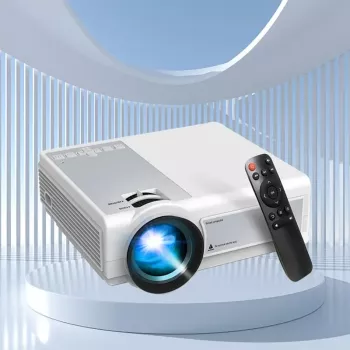
Mini LED Smart Projector: Portable Big-Screen Movies & Play

Mini LED Portable Smart Projector for Movies, Games, and On‑the‑Go Viewing
A compact mini LED smart projector can turn a wall, ceiling, or portable screen into an easy big-screen setup for movie nights, travel, dorm rooms, and casual gaming. The biggest differences between projectors usually come down to brightness, native resolution, focus/keystone tools, audio flexibility, and how painless it is to connect phones, laptops, and streaming devices.
If the goal is simple, room-to-room entertainment without a full home theater build, the Mini LED Portable Smart Projector is designed for quick setup and everyday viewing—especially when the room can be dimmed.
What a portable smart projector is best for
- Quick home theater setups in bedrooms, apartments, and small living rooms
- Travel-friendly entertainment for trips, RVs, and temporary stays
- Kids’ rooms and family movie nights with simple, low-clutter placement
- Casual gaming and sports viewing where a TV isn’t practical
- Backup display for presentations in a pinch (best in dim rooms)
Portable projectors shine when flexibility matters: move it from the bedroom to the patio, point it at a wall for a last-minute game, or pack it for an overnight trip. The tradeoff is that most small projectors look best in lower light, so planning for room brightness is as important as choosing the device itself.
Key features to compare before buying
- Brightness: higher lumens perform better with ambient light; dim projectors need darker rooms
- Native resolution vs. supported resolution: native matters most for sharpness; supported formats indicate playback compatibility
- Throw distance and image size range: confirm the projector can hit your preferred screen size in the space you actually have
- Focus and keystone correction: helps square the image when the projector isn’t perfectly centered
- Connectivity: HDMI/USB for reliable wired input; wireless casting depends on phone/OS and network conditions
- Audio: built-in speaker convenience vs. connecting to a soundbar/Bluetooth speaker for fuller sound
- Noise and heat: fan noise can be noticeable in quiet scenes; ventilation clearance matters
- Power options: wall power is most common; verify any battery claims and real-world runtime expectations
| Category | What to look for | Why it matters |
|---|---|---|
| Brightness | Lumens rating; best results in dim rooms if low | Determines how watchable the image is with lights on |
| Resolution | Native resolution; scaling quality | Affects text clarity and image detail |
| Setup tools | Manual/auto focus; keystone correction | Faster setup and a squarer picture |
| Inputs | HDMI, USB, audio out | Enables laptops, consoles, streaming sticks, and media files |
| Wireless | Casting/mirroring support; Wi‑Fi stability | Convenience for phones; varies by device and app |
| Audio | Speaker wattage; Bluetooth audio | Improves dialogue clarity and overall impact |
| Portability | Size/weight; protective case | Makes it easy to move room-to-room or pack for travel |
For connection standards and terminology, the official overviews at HDMI Licensing Administrator and the basics from the Bluetooth SIG are helpful references. If you want a quick glossary for projection concepts (throw, keystone, and more), ProjectorCentral provides a practical rundown.
Getting the best picture in real rooms
- Darken the room: close blinds and reduce overhead lighting to improve contrast
- Use a neutral surface: a smooth white/gray wall works, but a portable screen improves uniformity and sharpness
- Positioning: place the projector level with the screen center when possible to minimize keystone correction artifacts
- Dial in focus after warm-up: some projectors sharpen slightly after a few minutes of running
- Choose the right size: oversized images can look dimmer; a slightly smaller image often looks brighter and more detailed
- Audio upgrade: pairing with an external speaker can dramatically improve movie dialogue and bass presence
A simple habit that pays off: set the projector first, then adjust the screen size by moving the unit closer or farther rather than relying heavily on keystone correction. Keystone is convenient, but the most natural-looking picture typically comes from a more centered, level placement.
Everyday connection options (phones, laptops, streaming devices, and consoles)
Mini LED Portable Smart Projector highlights
| Use case | Room conditions | Recommended setup tip |
|---|---|---|
| Movie nights | Dim to dark | Use a screen or smooth wall; keep the image moderately sized |
| Kids’ room | Low light | Place securely; consider Bluetooth speaker for clearer dialogue |
| Travel/RV | Variable light | Pack HDMI cable; use curtains/blackout where possible |
| Casual gaming | Dim | Use HDMI to reduce lag; keep fan vents unobstructed |
To round out an at-home viewing corner, lighting and comfort can matter just as much as the screen. If you’re building a more polished living room vibe, the Luxury Gold Crystal Branch Chandelier – Modern Ceiling Pendant Lighting can elevate the space (and with dimmable lighting, it can help keep projector viewing comfortable). For trips or backyard nights, the 3-4 Person Outdoor Tunnel Tent can create a cozy, wind-blocked spot that’s naturally darker and more screen-friendly.
Care, longevity, and troubleshooting basics
FAQ
Can a portable LED projector replace a TV?
It can for nighttime viewing and flexible screen sizes, especially in bedrooms, dorms, or apartments where a wall can double as a screen. TVs still tend to win in bright rooms, for daytime viewing, and for quick always-on convenience.
Is HDMI better than wireless casting for movies and games?
HDMI is usually more reliable and has lower latency, which matters for gaming and lip-sync. Casting depends on network quality, device compatibility, and sometimes app restrictions, so it can be less consistent.
What’s the easiest way to improve sound from a small projector?
Pairing with a Bluetooth speaker or using an audio-out connection is the fastest upgrade. Built-in speakers are convenient, but external audio typically delivers clearer dialogue and fuller volume without distortion.












Leave a comment