


Long-Range FPV Quadcopter w/ Bluetooth: Setup & Range

Advanced Long-Range FPV Quadcopter with Bluetooth: Setup, Range Planning, and Flight Tips
Long-range FPV flying blends precision control with immersive video—making setup quality, radio/video link planning, and safety habits just as important as the quadcopter itself. When everything is dialed, long-distance cruising feels calm and intentional; when it isn’t, small issues (antenna placement, poor failsafe settings, or rushed configuration) can end a flight early. Below is a practical guide to choosing and configuring an advanced long-range FPV quadcopter with Bluetooth support, plus range planning and flight technique tips that help keep performance consistent.
What makes a long-range FPV quadcopter feel “advanced”
“Advanced” isn’t just a spec sheet—it’s how predictable the aircraft remains when conditions get real. For long-range work, the biggest upgrades are usually in stability, efficiency, and link reliability.
- Stable flight controller tuning that stays predictable in wind and during descents, reducing the “wobble” or surprise behavior that can ruin video and confidence.
- Efficient propulsion designed for longer cruise time, with lower heat buildup in motors and electronics during extended flights.
- A dependable control link and video system built for distance (not just short park flights), with good receiver performance and a video transmitter setup that’s optimized for range.
- Smart features that reduce setup friction, including Bluetooth-based configuration where supported, so you can verify settings without digging out a laptop.
- Upgrade-ready build choices for antennas, GPS modules, action camera mounts, and multiple battery formats—important as skills and mission profiles evolve.
Bluetooth features that matter (and what they don’t replace)
Bluetooth on an FPV quad is best treated as a field convenience tool. It can make setup smoother, but it doesn’t change the fundamentals of radio performance or video penetration.
- Typical use: quick configuration and parameter changes from a phone or tablet without tethering to a computer.
- Common tasks: checking basic settings, confirming modes, verifying status, and applying minor adjustments after a test hover or short loop.
- What it doesn’t do: Bluetooth does not increase control range or video range—it won’t compensate for a weak antenna, bad placement, or interference.
- Best practice: do major configuration work at home, then use Bluetooth at the field for verification and small refinements.
- Security note: pair intentionally and avoid leaving the quad discoverable when it’s not needed.
Range planning: control link, video link, and antennas
Practical long-range distance is the overlap between two separate links: your control link (radio to receiver) and your video link (aircraft to goggles/monitor). Whichever degrades first defines the limit you can safely fly.
Antenna choices and placement often matter as much as transmitter power. Even a high-power setup can underperform if the antenna is blocked by the frame, pointed the wrong way during cruise, or has a damaged connector. If you want a deeper antenna primer, Oscar Liang’s antenna guide is a solid reference: FPV antenna basics and practical guidance.
Also, remember that long-range isn’t just “how far out.” It’s how far out and back. Plan for the return trip with extra battery reserve for headwinds, navigation detours, and cautious climbs.
Pre-flight range checklist
| Item | What to verify | Why it matters |
|---|---|---|
| Control link | Receiver bound, failsafe set, link quality stable at short range | Prevents flyaways and ensures predictable behavior if signal degrades |
| Video link | Clear channel, stable image, antennas secured and oriented | Reduces breakup and dropouts that can cause disorientation |
| Antenna hardware | No loose connectors, no damaged coax, correct polarization | Connection losses can cut usable range dramatically |
| Battery plan | Voltage/capacity appropriate, reserve set for return | Long-range flights fail most often from low battery on the way back |
| Environment | Wind direction, obstacles, RF noise sources | Conditions can change the real-world range from what specs suggest |
First-time setup: a dependable baseline before longer flights
Before chasing distance, build a baseline you can trust. That baseline is less about “max settings” and more about repeatable behavior.
For regulatory and safety basics (including operational guidance), consult the FAA’s UAS resources: FAA — Drone Safety Guidance.
Practical flight technique for long-distance FPV
For general wireless and RF exposure information, the FCC’s overview is helpful background reading: FCC — Radio Frequency Safety (RF exposure) and wireless devices.
Care, storage, and upgrades that extend reliability
Product options
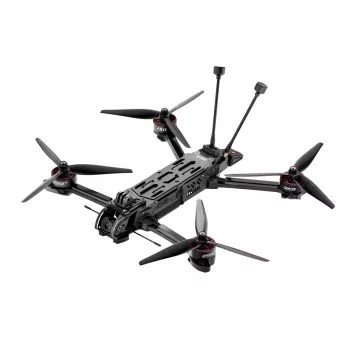
- Advanced Long-Range FPV Quadcopter with Bluetooth — a strong choice for pilots stepping up from short-range flying who want long-range capability paired with Bluetooth configuration support.
- 3-4 Person Outdoor Tunnel Tent — useful for longer field sessions where shade, wind cover, or an organized staging area helps keep gear protected and flights more methodical.
FAQ
How does Bluetooth help on a long-range FPV quadcopter?
Bluetooth mainly helps with quick setup and verification from a phone or tablet, such as checking status, confirming modes, or applying minor tuning tweaks in the field. It’s a convenience layer and does not improve actual control or video range.
What limits long-range FPV distance more: the control link or the video link?
Real-world distance is limited by whichever link becomes unreliable first—control or video. Antenna quality/placement, line-of-sight, and local interference often matter more than raw transmitter power.
What should be checked before attempting a longer FPV flight?
Confirm failsafe behavior, ensure antennas/connectors are secure, verify a clear video channel, and plan battery reserve for the return trip. Also account for wind direction, obstacles, and potential RF noise sources that can reduce usable range.
Recommended for you
8K 5G GPS Dual-Camera Drone: Flight & Buying Guide
Aug 20, 2026













Leave a comment